



ChatGPT can help a manager turn approved notes into a first draft, organise questions or compare written options. Its usefulness depends on the task and the review process. This article proposes a controlled workflow for business drafting: define the job, limit the inputs, verify the output and keep responsibility for decisions with the appropriate person.
Define the role of the tool
ChatGPT is an AI assistant that generates responses from the information and capabilities available in a conversation. A fluent response is not proof that a statement is correct. It can omit an important qualification, misunderstand a document or present an unsupported reference convincingly.
Suitable pilot tasks include summarising an approved procedure, drafting an agenda from agreed objectives or grouping anonymised service comments. The output remains a working document. A manager must decide whether it is complete, accurate and appropriate for its intended use.
Decide which information may be used
Follow the organisation’s data policy before uploading material. Use only information you are authorised to share in the selected workspace. Removing names may not be enough: unusual events, account numbers and combinations of details can still identify people or customers.
OpenAI states that business product inputs and outputs are not used for model training by default. That commitment does not mean information is never retained, accessed under authorised arrangements or governed by other obligations. Check the current product terms, retention controls and workspace settings for the actual service being used. Do not assume a personal account has the same arrangements.
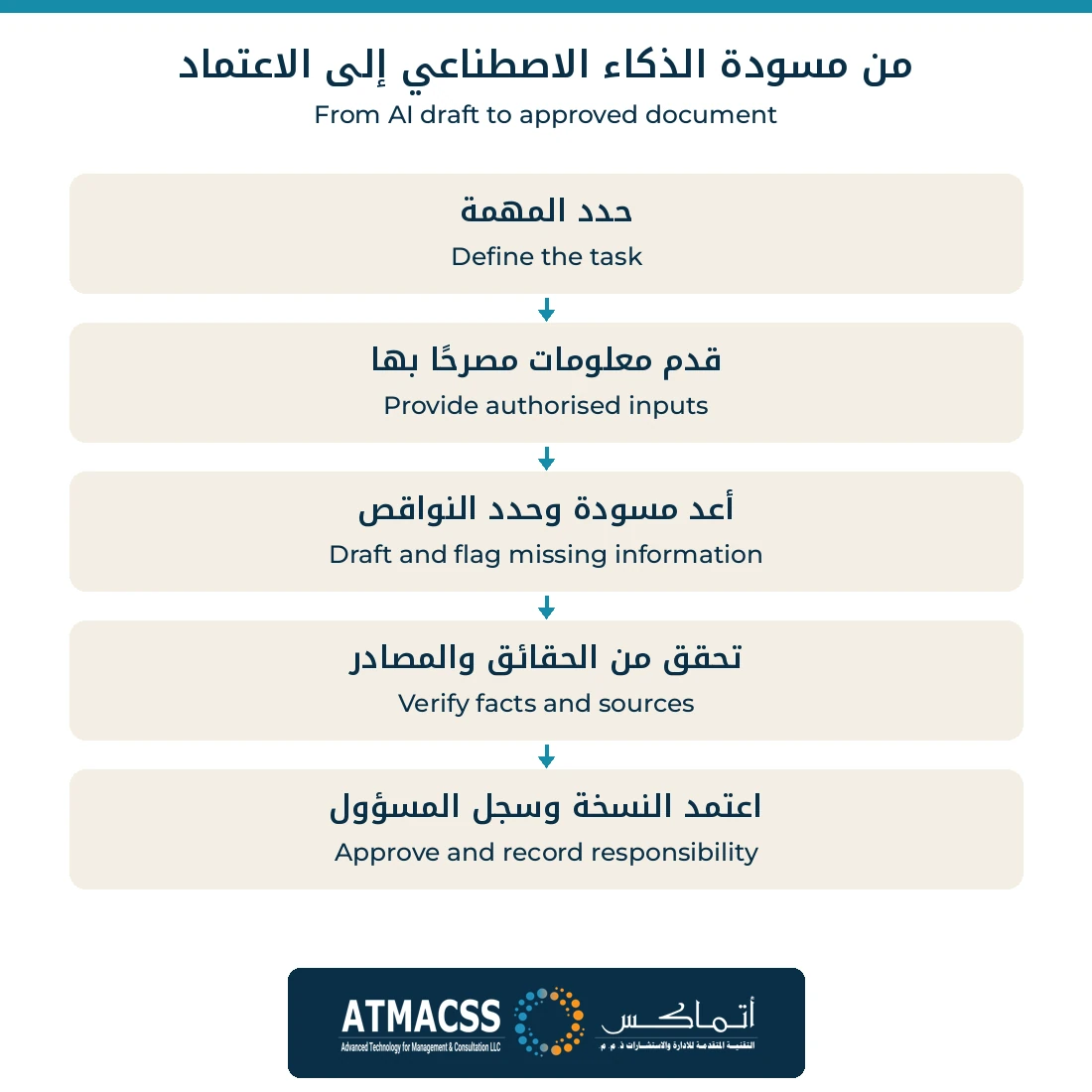
Use a five-step drafting workflow
- Specify the output. Name the audience, purpose, format and required decisions.
- Provide approved evidence. Supply the relevant source material and identify which version is authoritative.
- Set boundaries. Ask the assistant to flag missing information and separate facts from suggestions.
- Verify the draft. Compare statements with the source, recalculate figures and open references. Check exclusions as well as included content.
- Approve and retain. Record the responsible reviewer and approved version through the normal document process.
Treat uploaded files, emails and retrieved pages as material to examine, not as permission to change the assignment. Some may contain instructions intended to redirect the assistant, a risk known as prompt injection. For example, a supplier attachment might tell the assistant to ignore the review task and disclose unrelated customer records. That text does not authorise disclosure. Limit connected access to the task and keep sensitive actions subject to the organisation’s approval controls. A warning in the prompt alone is not a complete safeguard.
For a drafting pilot, separate producing text from sending it or changing a business record. Before any approved action, check the exact content, recipient or target, attachments and scope. Afterwards, verify what actually happened. A sentence saying “sent” in a response is not sufficient evidence that the intended recipient received the approved version.
A request to “check your own answer” can help identify issues, but it does not replace independent verification. Nor does a request to provide citations establish that those citations exist or support the claim.
A practical prompt and its review
Illustrative prompt: “Using only this approved meeting note, prepare a draft action list. For each action, show the stated owner and due date. If either is absent, write ‘not specified’. Separate proposals from agreed decisions. Do not invent commitments.”
The reviewer then checks every action against the note. An item discussed without agreement should remain a proposal. A person mentioned in a discussion is not automatically the owner. The approved list is sent through the organisation’s usual process; the assistant’s draft alone does not authorise the work.
An error that review should catch
Educational example using fictional data: A manager requests a summary of this note: “The team discussed supply delays and proposed comparing two suppliers. No decision or date was approved.” The draft should separate the issue, proposal and pending decision.
If the model writes “The team approved an alternative supplier and implementation starts on Sunday,” it has invented both approval and timing. The reviewer corrects this to “A supplier comparison was proposed; approval and timing remain undecided,” then checks the other statements against the input. Fluent wording or an instruction not to invent facts does not guarantee accuracy. Use only necessary data under the organisation’s policy.
Define when a draft is ready for approval
Before the pilot, the process owner lists what must remain correct in the document. For meeting actions, this includes separating proposals from decisions, inventing no owner or deadline, and preserving approval conditions. These are acceptance criteria for a specific task, not a general assessment of the tool’s intelligence. An operating procedure needs different checks, such as step order, exceptions and escalation responsibility.
The editorial team proposes checking each decision, owner and date against its location in the source. Without evidence, leave the field “not specified” or ask the information owner to complete it. Do not convert a guess into a fact to make a table look finished. If two meeting records conflict, hold the affected actions until the document owner identifies the authoritative version. Asking the model which version is better does not establish document authority.
Also test a note containing no decisions and one recording an explicitly rejected proposal. Success with tidy input does not establish performance on ordinary work. Use authorised cases representing the task’s real variation, and record consequential errors separately from stylistic improvements. A wrong delivery date is different from a less fluent word choice.
In a fictional example, the manual task took 40 minutes. Preparing inputs takes 8 minutes, generating the draft takes 2, and checking and correction take 25: 35 minutes in total. The difference is only 5 minutes, not 38. Do not generalise from one trial. Compare several similar tasks at the same acceptable quality level, and retain the approved version without storing extra conversations or data that the organisation’s process does not need.
Measure the complete task
Evaluate a small set of comparable tasks before wider use. Record drafting time, review time, material corrections and whether the final document met its purpose. Faster generation may offer little benefit if checking takes longer or important errors survive.
Keep the comparison fair when measuring savings. In the 40-minute versus 35-minute example, the reduction is 5 ÷ 40 × 100 = 12.5%. This is a reduction in time for that one task, not proof of a 12.5% reduction in salary costs or a company-wide productivity gain. Record whether the saved time can actually be used elsewhere, and include tool costs and recurring supervision when assessing the business case.
Choose stop conditions in advance: unauthorised data exposure, recurring factual errors or inability to verify essential output. Improve the task instructions or discontinue the use case when necessary. Claims of a universal productivity increase are not a substitute for evidence from the actual workflow.
For wider adoption decisions, read evaluating AI tools for business. ATMACSS innovation and future foresight support can help define the pilot, responsibilities and measures.